)
)
Accessible Kiosk Design: Building Inclusive Self-Service Experiences That Work for Everyone
At Storm Interface, we have spent decades designing
solutions that support accessible self-service across a wide range of
industries. Accessibility is not an optional feature or a late stage addition.
It is the foundation of good interactive kiosk design. In this article, we
explore what accessible kiosk design really means, why kiosk accessibility
benefits everyone, and how organisations can build inclusive self-service
systems from the ground up.
What Does Accessible Kiosk Design Really Mean?
An accessible kiosk allows every user, regardless of ability, to complete the same tasks independently, safely and with confidence. This includes people with visual, auditory, cognitive and physical disabilities, as well as those experiencing temporary or situational impairments.
True kiosk accessibility means equal access to every function, not a reduced or simplified version of the experience. Whether a user is buying a ticket, entering personal information or making a payment, the journey should be fully usable without relying on sight, sound or fine motor control alone.
This is where inclusive thinking becomes essential. An inclusive self-service kiosk is designed from the outset to support different ways of interacting, resulting in systems that are easier and more intuitive for everyone, not just people with disabilities.
Equal Access Starts with Thoughtful Design
The goal of accessible self-service is simple: no user should be excluded because of how they interact with technology.
For example, a transport ticketing kiosk should allow a blind user wearing headphones to complete the same transaction independently as a sighted user using a touchscreen. This requires alternative input methods, clear feedback and a consistent accessible user interface that works across different interaction modes.
Designing for accessibility often leads to better usability overall. Clearer instructions, improved layouts and predictable interactions benefit all users, particularly in busy or high pressure environments.
Tactile Input: Essential for Independence
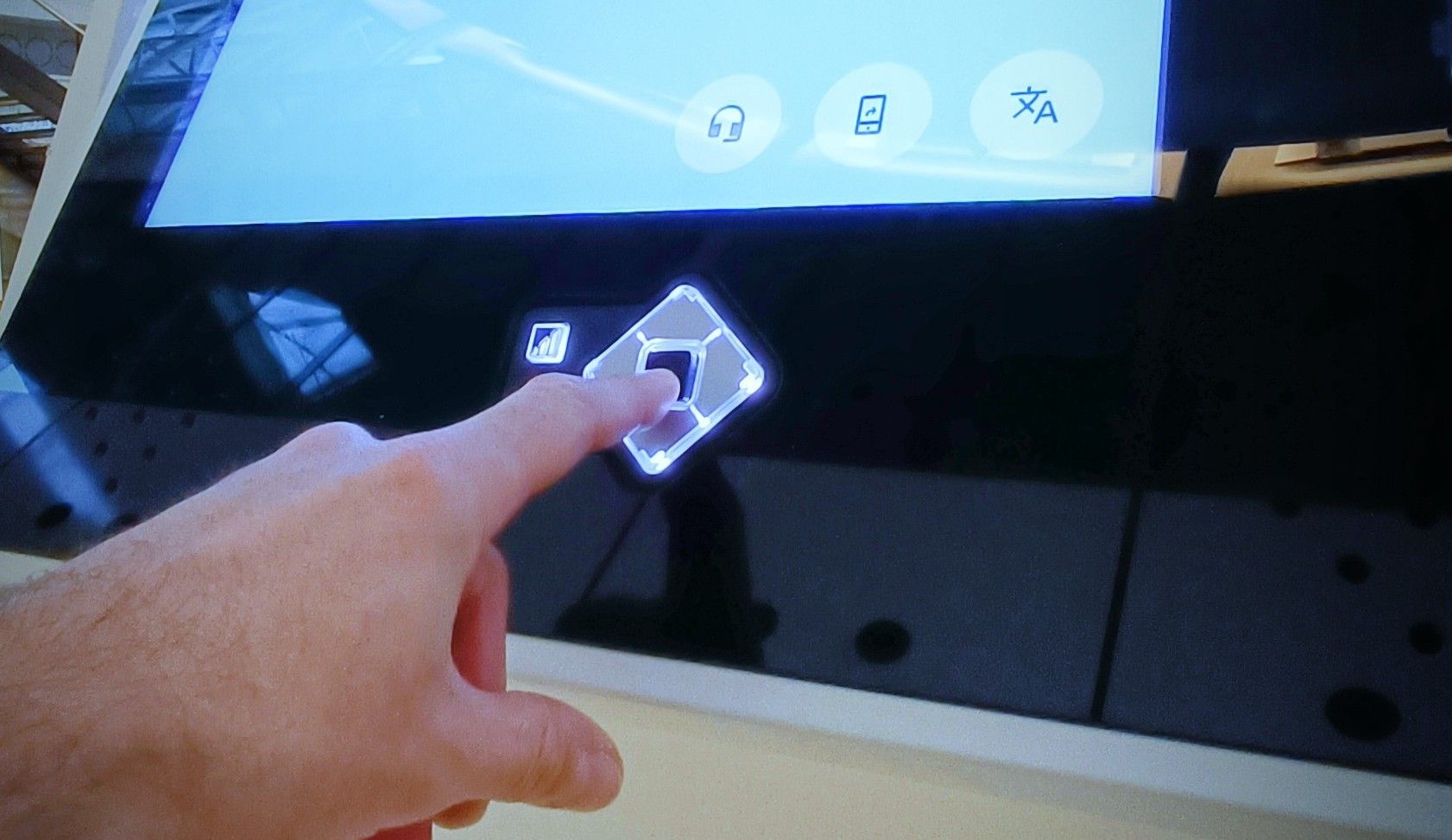
Touchscreens alone cannot meet the needs of all users. Physical input options remain essential, particularly for blind users and those with motor impairments.
Tactile input is a cornerstone of accessible kiosk design because it provides a dependable, non-visual way to interact with the system.
Audio Access: Giving Information a Voice
For users who are blind or have low vision, spoken guidance is critical. A kiosk with audio output should deliver step by step feedback for every on-screen action.
When headphones are connected, the kiosk should automatically switch to private audio mode, reading menu options, instructions and confirmations while protecting sensitive information. A well implemented audible experience supports privacy, independence and confidence.
Clear Feedback Builds Confidence
Every interaction should generate clear and perceivable feedback. This might be an audio tone, a spoken confirmation such as “Card accepted”, a tactile response or a visual highlight.
Clear feedback helps users understand that the kiosk has registered their action and indicates what happens next. This is especially important for people with disabilities, but it also improves usability for first time users and those in fast paced environments.
Consistency Makes Interfaces Easier to Learn
Consistency is one of the most effective tools in accessible kiosk design. Predictable layouts, logical focus order and uniform control placement allow users to build familiarity and confidence over time.
When self-service kiosks across different locations share the same interaction patterns, users do not need to relearn the interface each time. This is particularly valuable for users with cognitive disabilities and anyone who benefits from clarity and routine.
Reachability for All Users
Physical reach is just as important as digital access. Screens, payment devices, keypads and audio ports must be positioned so they are usable by people of different heights and mobility needs. Inclusive kiosk design ensures that seated and standing users can access all functions independently, without stretching, bending or assistance.
Privacy and Safety Are Part of Accessibility
Accessibility also means being able to interact safely and privately. Users must be able to enter PINs or personal information without being observed or needing help.
Features such as tactile keypads, private audio output and physical privacy measures support secure use. An ADA compliant kiosk must consider both functional access and user safety.
Multimodal Design: More Than One Way to Interact
Information should always be available through more than one sensory channel. Visual text, spoken audio and tactile controls should work together as part of a robust accessible user interface.
Multimodal design ensures that when one sense is unavailable, others provide equivalent access. This flexibility is central to inclusive self-service kiosk design and benefits users in noisy, bright or crowded environments.
Maintenance, Testing and Continuous Improvement
Accessibility does not end at deployment. Self-service kiosks must be tested in real world environments and maintained throughout their lifecycle.
Involving people with disabilities in testing helps identify issues that may not be apparent during development. Regular reviews and updates ensure kiosks continue to meet evolving requirements such as ADA in the United States and the European Accessibility Act in Europe.
Designing a More
Inclusive Future
By embedding accessibility and inclusive principles from the start, organisations can deliver accessible self-service that works better for everyone. Compliance is important, but the real value lies in creating experiences that respect users and support independence.
As a long-standing specialist in accessible kiosk solutions, Storm Interface works with organisations worldwide to deliver practical, scalable and standards compliant systems. If you are exploring how to improve kiosk accessibility, we would be happy to be part of that conversation.